








Most students do not fail because they are not smart. They fail because they never decide when to study, what to study, and for how long. If you have ever opened your books at 10 p.m. and wondered where to start, a plan is the missing piece. Learning how to make a study schedule gives your week a clear shape, so you stop guessing and start finishing.
A good schedule does three things. It tells you exactly what to do next, it spreads your workload so you avoid last-minute cramming, and it protects time for sleep, meals, and rest. In this guide, you will learn a simple seven-step method, get a ready-to-use template, and see how to adapt it for exams, college, high school, the MCAT, and even a full-time job. You will also find tools like Google Sheets, Google Calendar, Excel, Notion, and AI, so you can pick the one that fits you.
What Is a Study Schedule and Why Does It Work?

A study schedule is a written plan that assigns specific subjects, tasks, and time blocks to the days of your week. It turns a vague goal like “study more” into clear actions like “Tuesday, 6 to 7 p.m., chemistry practice questions.”
Study Schedule vs. Study Plan: What Is the Difference?
People often use the two terms together, but they are not identical. A study plan is the big picture: your goals, deadlines, and the topics you must cover. A study schedule is the calendar version: the exact days and times you will do the work. You need both. The plan tells you what matters, and the schedule makes sure it happens.
Why a Schedule Beats Studying Whenever You Feel Like It
Waiting for motivation is unreliable. A schedule removes the daily decision, which saves mental energy. It also lets you use spaced practice, which means reviewing material over several days instead of one long session. Learning research has shown for decades that spreading study over time helps people remember more than cramming does.
Who Needs a Study Schedule?
Anyone with more tasks than time can benefit. That includes high school students, college students, adults returning to school, and people preparing for big tests such as the MCAT, SAT, or certification exams.
How to Make a Study Schedule in 7 Steps
Follow these steps in order. The whole process takes about 20 to 30 minutes.
Step 1: List Everything You Need to Study
Write down every subject, assignment, and exam you have coming up. Include the due dates. Pull this from your syllabus, school portal, or course emails. A messy list is fine at this stage. The goal is to see the full picture in one place.
Step 2: Rank Your Subjects by Priority
Not every subject needs the same time. Rank each one using three questions:
- How soon is the deadline or exam?
- How many marks or points does it carry?
- How confident do I feel about the material?
Give more time to subjects that are urgent, heavily weighted, or hard for you.
Step 3: Block Out Your Fixed Commitments
Open a blank weekly calendar and add everything that cannot move: classes, work shifts, commuting, meals, sleep, family time, and exercise. What remains is your real study time. Many students skip this step and build unrealistic plans that fall apart by Wednesday.
Step 4: Choose Your Best Study Times
Notice when you focus best. Some people think clearly in the morning, others after dinner. Place your hardest subject in your best time slot. Save easier tasks, like organizing notes, for when your energy dips.
Step 5: Set Session Length and Breaks
Aim for focused blocks of 45 to 60 minutes followed by a 10 minute break. If that feels long, try the Pomodoro method: 25 minutes of work and a 5 minute break, with a longer break after four rounds. Shorter, sharper sessions beat long, tired ones.
Step 6: Assign Specific Tasks to Each Block
“Study biology” is too vague. “Read chapter 6 and answer 15 practice questions” is clear. Each block should have one defined task and a way to measure it. This is what makes a schedule easy to follow.
Step 7: Add Review Time and a Buffer
Schedule a short review every few days, plus a longer weekly review on the weekend. Leave one or two open blocks each week for tasks that run long or surprise assignments. A schedule with no buffer breaks the first time life gets busy.
Study Schedule Template You Can Copy Today

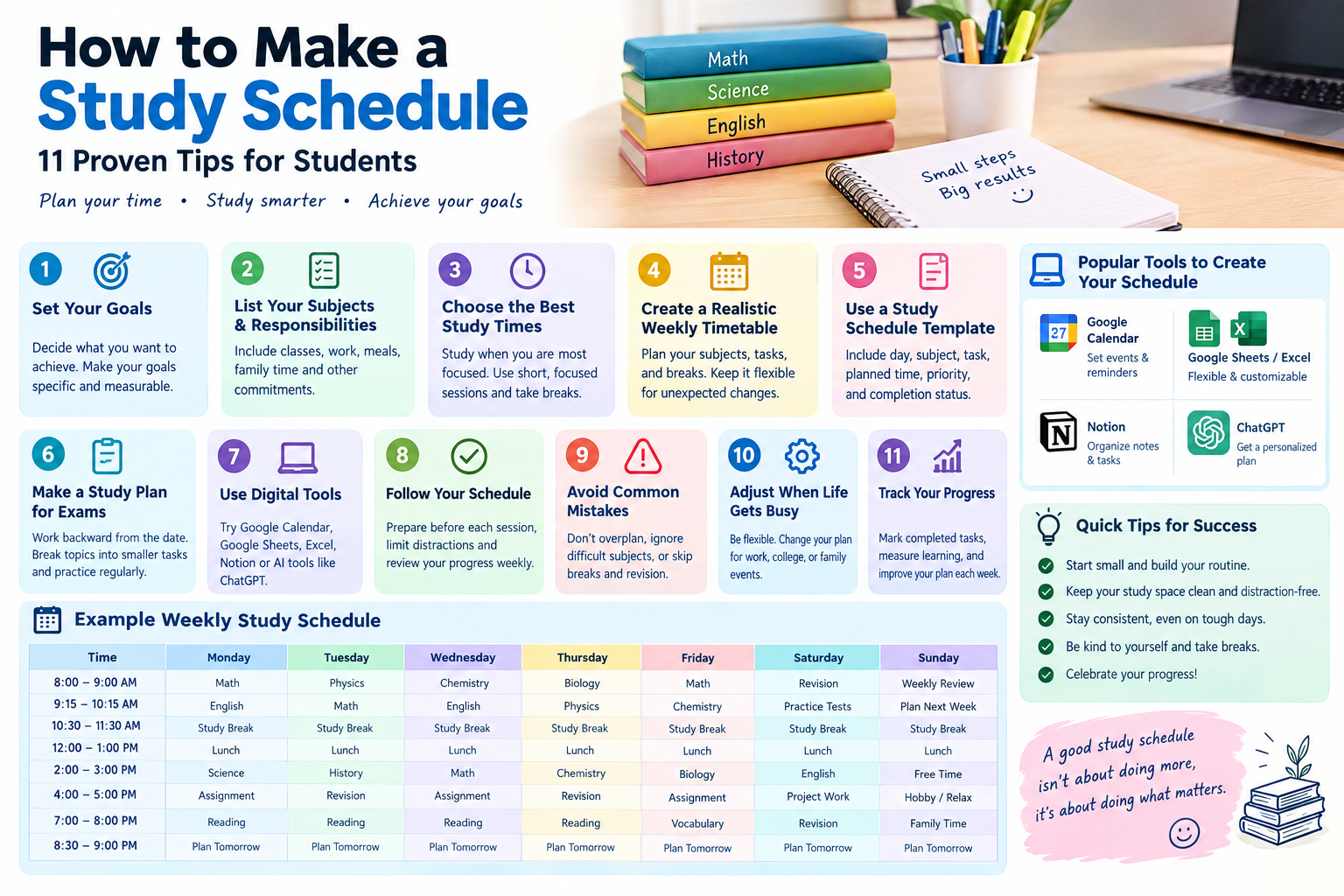
Here is a simple study schedule template for a student studying at home. Copy it into a notebook, spreadsheet, or calendar and change the subjects to match your own.
Weekly Timetable for Study for a Student at Home
| Time | Mon | Tue | Wed | Thu | Fri | Sat | Sun |
| 8:00 – 9:00 | Math | English | Science | Math | History | Weekly review | Rest |
| 9:00 – 9:15 | Break | Break | Break | Break | Break | Break | Rest |
| 9:15 – 10:15 | Science | Math | English | History | Science | Practice test | Plan next week |
| 4:00 – 5:00 | History | Science | Math | English | Math | Hobby / free | Rest |
| 5:00 – 5:30 | Review notes | Review notes | Review notes | Review notes | Review notes | Free | Free |
| 7:00 – 8:00 | English | History | Free | Science | Free | Free | Light reading |
This layout gives you about three to four hours of study on weekdays, one weekly review, and real days off. Adjust the hours based on your school load.
Daily Routine Checklist
Use this short checklist each day to stay on track:
- Check today’s tasks before you start.
- Study your hardest subject first.
- Put your phone out of reach.
- Take a real break every hour.
- Write down what you finished and what carries over.
- Spend five minutes planning tomorrow.
Study Schedule PDF: Print It or Save It
If you prefer paper, build your template in Google Docs, Word, or a spreadsheet and download it as a study schedule PDF. Print it and stick it on your wall or desk. Seeing your plan every day makes you more likely to follow it. If you want a fillable version, a spreadsheet works better than a PDF because you can edit it as your week changes.
How to Make a Study Plan for Different Situations

The seven steps stay the same, but your goals and time change. Here is how to adapt them.
How to Make a Study Plan for Exams
Work backward from your exam date. Divide your time into three phases: learning the material, practicing with questions, and final review. For example, with four weeks left, spend week one and two learning, week three practicing past papers, and week four on weak areas and light review. Rank topics by marks and your confidence level, and give the weakest high-value topics the most time. If you only have one week, see our guide on how to study for exams in one week.
How to Make a Study Schedule for College and College Students
College gives you more freedom and less structure than high school, so a schedule matters even more. A common guideline is to study about two hours outside of class for every hour you spend in class, although harder courses may need more. Add your lectures, labs, and part-time job first, then fill the gaps with study blocks. Use weekends for review, and plan ahead for midterms and finals by marking them on your calendar at the start of the semester.
How to Make a Study Schedule for High School
High school students usually have a fixed school day, so the best study time is after school and in the evening. Start with homework, then use any extra time for review and test preparation. Keep sessions shorter, around 30 to 45 minutes, and leave room for sports, family, and sleep. Teenagers generally need 8 to 10 hours of sleep, so do not trade it for study time.
How to Make a Study Schedule While Working Full Time
When you work full time, small consistent blocks beat rare long sessions. Look for pockets of time: a 30 minute lunch break, a commute spent listening to lectures, or an hour before work. Plan for 8 to 12 focused hours a week if your course allows, and keep weekends for longer sessions. Be realistic. A plan with four solid sessions you actually do is better than seven you abandon.
How to Make a Study Plan for University Application
Applying to university involves several moving parts: entrance exams, essays, recommendation letters, and deadlines. Start by listing every deadline for each school. Then work backward and set dates for finishing drafts, taking practice tests, and submitting documents. Give essays at least two weeks for drafting and revising. Keep one weekly block just for application tasks so nothing slips.
How to Make a Study Schedule for the MCAT
The MCAT is a long-term effort. Many students plan three to six months of preparation, depending on their starting point and weekly hours. A common structure is content review first, then practice questions, then full-length practice exams in the final weeks. Review every wrong answer and note why you missed it. Schedule one full practice test every one to two weeks near the end. Check the official AAMC resources for the latest test format and materials.
Best Tools to Build Your Study Schedule

The best tool is the one you will actually open every day. Here is how the most popular options compare.
| Tool | Cost | Best For | Main Drawback |
| Paper planner | Low | People who like writing by hand | Hard to change once filled |
| Google Sheets | Free | Custom templates and sharing | Needs basic setup |
| Google Calendar | Free | Reminders and time blocking | Not great for task lists |
| Excel | Paid or included with Office | Detailed tracking and formulas | Less mobile-friendly |
| Notion | Free plan available | All-in-one planning and notes | Takes time to learn |
| Study planner apps | Free or paid | Class schedules and deadlines | Features vary by app |
How to Make a Study Schedule on Google Sheets
Open a new sheet and put the days of the week across the top and time slots down the side. Color-code each subject so you can scan your week at a glance. Add a second tab for deadlines and a third for a weekly checklist. You can share the sheet with a study partner and edit it from your phone.
How to Make a Study Schedule on Google Calendar
Create a separate calendar named “Study.” Add each session as an event with a clear title like “Chemistry: chapter 4 practice questions.” Set a repeat for regular blocks and turn on notifications 10 minutes before each one. Seeing study blocks next to your classes and work shifts shows your true availability.
How to Make a Study Schedule on Excel
Set up a weekly grid just like the template above. Use conditional formatting to turn a cell green when you mark a task as done. Add a simple formula to total your weekly study hours. Excel is a strong choice if you like tracking progress with numbers and charts.
How to Make a Study Schedule on Notion
Create a database with columns for subject, task, due date, and status. Switch between a calendar view and a board view depending on your mood. Many students build a weekly template page and duplicate it each Sunday. Notion works well if you want your notes, tasks, and schedule in one place.
How to Use AI and ChatGPT to Make a Study Schedule
AI tools can save time, especially when you are staring at a long list of tasks. They work best as a starting draft that you then adjust. Always check dates and the realism of the plan yourself.
How to Ask ChatGPT to Make a Study Schedule
The quality of the answer depends on the details you give. Include your subjects, exam dates, available hours, and any limits. For example:
I am a college student with biology, statistics, and English exams in four weeks. I study on weekdays from 6 to 9 p.m. and on weekends for four hours. Biology is my weakest subject. Create a weekly study schedule table with review days and one rest day.
Then ask follow-up questions, such as “Move more time to statistics” or “Add a weekly practice test.” This back and forth gets you a plan that fits your life.
Pros and Cons of Using AI to Make a Study Schedule
Pros: it is fast, it can organize a large list, and you can adjust it by simply asking. Cons: it does not know your real energy levels, it may suggest too many hours, and it can make mistakes with dates. Treat the result as a draft, test it for one week, and fix what does not work.
Common Mistakes and How to Fix Them
Even a well-built schedule can fail if you fall into these traps.
Planning Too Much in Too Little Time
This is the most common mistake. If your plan has no breaks and no free time, you will give up by day three. Plan 80 percent of your available time and keep the rest as a buffer.
Ignoring Review and Practice
Reading your notes again and again feels productive but builds weak memory. Replace some reading time with practice questions, flashcards, and explaining ideas out loud. Mix new material with review each week.
Never Updating the Schedule
Your first schedule is a draft. At the end of each week, ask what worked and what did not. Move tasks that never get done, shorten sessions that feel too long, and adjust to your real pace. A flexible schedule lasts longer than a perfect one.
Frequently Asked Questions
How do you make a study schedule step by step?
List your subjects and deadlines, rank them by priority, and block out fixed commitments like classes and work. Pick your best study times, set 45 to 60 minute sessions with breaks, assign a clear task to each block, and add review time. Update the plan weekly.
How many hours a day should I study?
It depends on your level and workload. High school students often study one to three hours a day, and college students commonly need two hours of study for each hour of class. During exam periods, four to six focused hours is realistic. Quality matters more than total hours.
What is the best study schedule for students?
The best schedule fits your classes, energy, and goals. A strong one uses short focused sessions, puts hard subjects at your best time of day, includes weekly review, and leaves time for sleep and rest. Test it for a week and adjust.
How do I make a study plan for exams?
Work backward from your exam date. Split your time into learning, practice, and final review. Rank topics by marks and how well you know them, and spend more time on weak, high-value areas. Take timed practice tests in the last stage.
Can I make a study schedule on Google Sheets or Excel?
Yes. Put days across the top and time slots down the side, then add subjects and color codes. Google Sheets is free and easy to share, while Excel is better for tracking hours with formulas. Both can be saved as a PDF for printing.
How do I make a study schedule while working full time?
Use small, consistent blocks. Study during lunch breaks, commutes, or early mornings, and keep longer sessions for weekends. Aim for a realistic weekly total, often 8 to 12 hours, and protect your sleep. A short daily habit works better than occasional long sessions.
Can ChatGPT make a study schedule for me?
Yes, if you give it clear details. Share your subjects, exam dates, daily free hours, and weak topics, and ask for a table. Then review the plan for realism and adjust it. Use AI as a helpful draft, not a final answer.
Is a study schedule better than studying when I feel like it?
For most students, yes. A schedule builds a habit, reduces stress, and prevents last-minute cramming. It also supports spaced practice, which helps memory. You can still stay flexible, but a basic plan keeps you moving toward your goals.
Conclusion
Knowing how to make a study schedule is one of the most useful skills a student can learn. List your tasks, rank them, block out your fixed commitments, choose your best study times, and give each session a specific job. Add review time and a buffer, then adjust every week. Whether you build your plan on paper, Google Sheets, Google Calendar, Excel, Notion, or with AI, the best schedule is the one you follow.
Your next step is simple. Spend 20 minutes today writing down your subjects and deadlines, copy the template above, and fill in your first week. Start tomorrow, and improve it as you go penstripe.blog