







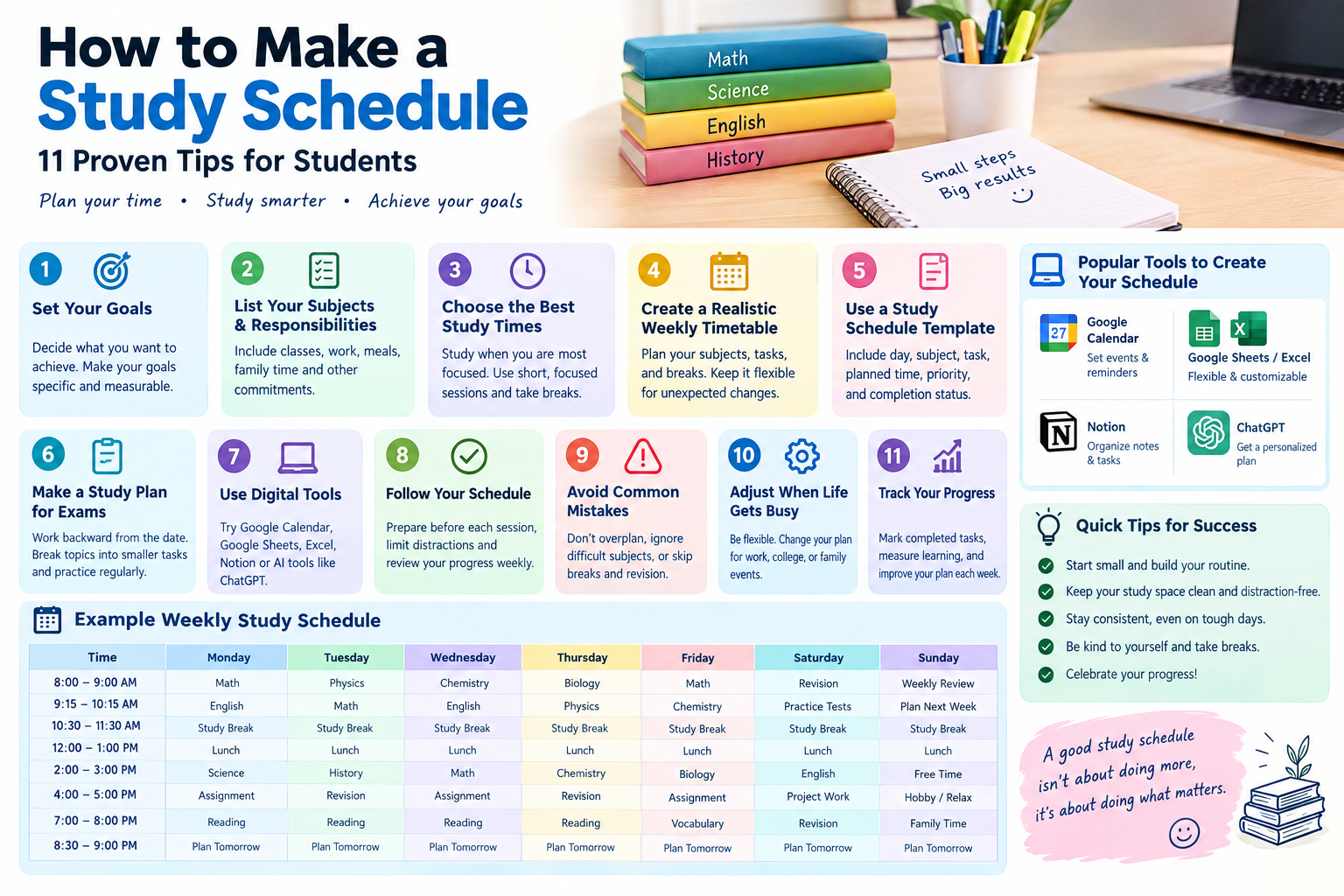
A busy school or college routine can make studying feel overwhelming. You may have several assignments, upcoming exams, and difficult subjects to manage. Without a clear plan, it is easy to waste time deciding what to study first. A simple schedule can help you stay organized and make steady progress.
LearningHow to Make a Study Scheduledoes not mean filling every minute with schoolwork. It means choosing realistic study times, setting priorities, and leaving enough room for breaks and personal responsibilities. The best schedule is one you can follow consistently, even on busy days.
Whether you study at home, attend high school, or manage college classes alongside a job, a structured plan can make your workload easier to handle. You can create one with a notebook, a printable study schedule template, Google Calendar, Excel, or Google Sheets.
In this guide, you will learn how to build a practical study routine, prepare for exams, choose useful planning tools, and adjust your timetable when life gets busy. You will also find a sample schedule you can adapt to your own needs.
1. Understand Your Study Goals Before Planning

Before creating a timetable, decide what you want to accomplish. A schedule without clear goals can become a list of study hours rather than a plan for learning.
Set Specific and Measurable Goals
Choose goals that describe what you need to complete. Instead of writing “study biology,” identify a clear task, such as reviewing two chapters or answering 20 practice questions.
Specific goals help you measure progress. They also make it easier to decide how much time each subject needs.
For example, your weekly goals might include:
- Complete two mathematics problem sets.
- Review three biology chapters.
- Write an outline for an English essay.
- Practice vocabulary for 15 minutes each day.
- Review mistakes from the previous test.
These tasks are easier to schedule because you know what finishing them looks like.
Prioritize Important Tasks
Not every assignment deserves the same amount of attention. Consider deadlines, exam dates, topic difficulty, and your current understanding of each subject.
A useful approach is to divide tasks into three groups:
- High priority: Upcoming exams, overdue work, and difficult topics.
- Medium priority: Regular assignments and weekly revision.
- Low priority: Optional reading and activities without immediate deadlines.
Complete high-priority tasks early enough to avoid last-minute pressure. However, do not ignore easier subjects for too long. Regular review helps prevent small gaps from becoming larger problems.
Estimate How Much Time You Need
Estimate the time required for each task before adding it to your calendar. A short reading assignment may take 30 minutes, while a challenging problem set could require an hour or more.
Use your previous experience to make reasonable estimates. If you consistently underestimate tasks, add a small buffer to your schedule.
2.How to Make a Study Schedule
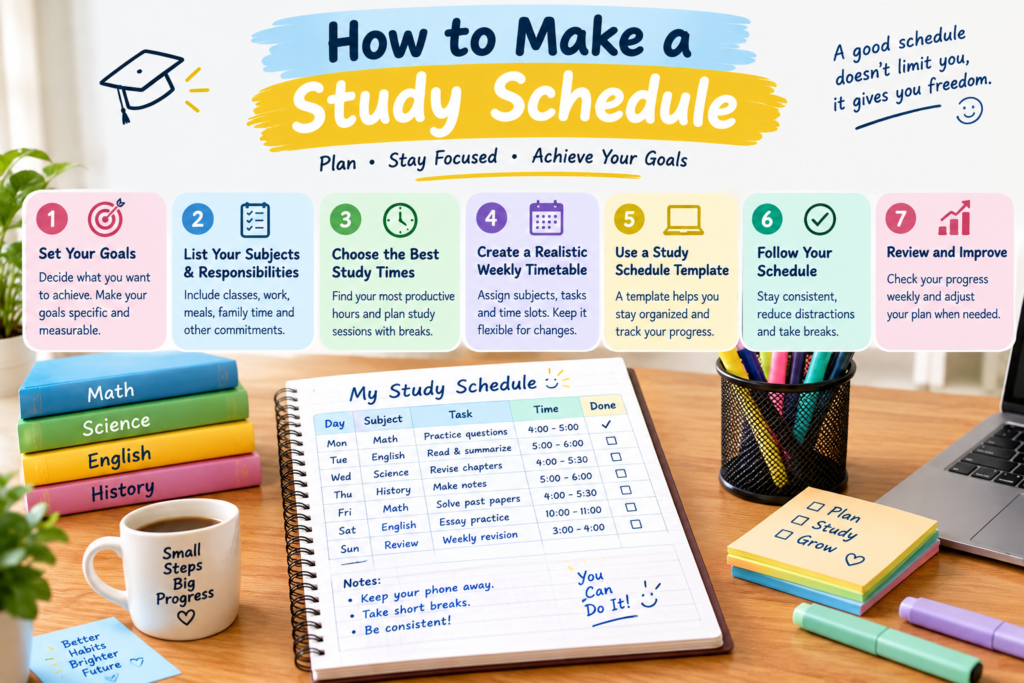
A useful timetable reflects your actual life. Before assigning study periods, identify the activities that already occupy your day.
Write Down Your Fixed Commitments
List your school or college classes, work hours, commuting time, meals, family responsibilities, and regular activities.
These commitments form the foundation of your schedule. Once you understand your available time, you can assign study sessions without creating unnecessary conflicts.
For example, a college student who finishes classes at 3 p.m. may have time for a short review session before dinner and a longer session later in the evening.
Identify Your Available Study Hours
You do not need to study for eight hours every day to create an effective routine. Your available time depends on your workload, responsibilities, and energy levels.
A student with two free hours might use them for one difficult subject, a short revision session, and a break. Another student may prefer several shorter sessions throughout the day.
Focus on the time you can realistically protect rather than the number of hours other students claim to study.
Balance Difficult and Easy Subjects
Give more time to subjects that require additional practice or contain unfamiliar material. Schedule lighter tasks when your energy is lower.
For example, mathematics may need a focused 45-minute session, while reviewing vocabulary may fit into a 15-minute period.
This approach helps you use limited study time more effectively.
3. Choose the Best Times for Studying

The best time to study depends on your personal routine and alertness. Some students concentrate better in the morning, while others work more comfortably in the afternoon or evening.
Find Your Most Productive Hours
Notice when you feel most awake and focused. If you understand difficult concepts more easily in the morning, reserve that period for challenging subjects.
If evenings work better for you, plan your demanding tasks then, provided you still get enough sleep.
Try different study periods for a week and observe which ones help you complete tasks with fewer distractions.
Use Short, Focused Study Sessions
Long sessions are not always the most productive option. Breaking work into manageable blocks can make it easier to start and maintain concentration.
For example, you could study for 25 minutes and take a five-minute break. After several sessions, take a longer rest.
Another option is a 45-minute study block followed by a 10-minute break. Choose a pattern that matches the difficulty of your work and your ability to concentrate.
Protect Your Sleep and Breaks
Do not build a schedule that depends on sleeping less. Sleep supports attention, memory, and learning, so sacrificing it regularly can make studying harder.
Include meals, movement, relaxation, and a reasonable bedtime in your plan. These are essential parts of a sustainable routine, not rewards you must earn after finishing every task.
4. Create a Realistic Weekly Timetable
A weekly timetable gives you an overview of classes, assignments, revision, and free time. It also helps you notice whether you have placed too much work on a single day.
Build Your Schedule Step by Step
Follow these steps to create a timetable that fits your routine.
- Write down fixed commitments.
- Add important deadlines and exam dates.
- Choose study periods that match your available hours.
- Assign specific subjects and tasks to each period.
- Include short breaks between demanding sessions.
- Leave some unplanned time for unexpected work.
- Review the timetable at the end of each week.
Start with a manageable workload. You can increase your study time later if the routine feels comfortable and your goals require it.
Example: Timetable for a Student at Home
The following example shows how a student studying at home might organize an afternoon and evening.
| Time | Activity |
| 3:30–4:00 p.m. | Snack and rest |
| 4:00–4:45 p.m. | Mathematics practice |
| 4:45–4:55 p.m. | Short break |
| 4:55–5:40 p.m. | Science revision |
| 5:40–6:30 p.m. | Free time |
| 6:30–7:00 p.m. | Dinner |
| 7:00–7:30 p.m. | English reading |
| 7:30–7:45 p.m. | Review notes and plan tomorrow |
This is an example, not a universal timetable. Change the times to match your classes, family routine, energy levels, and deadlines.
Make Your Schedule Flexible
Avoid planning every minute of the day. If an assignment takes longer than expected, a rigid timetable can quickly become frustrating.
Leave a few open periods during the week. Use them to finish delayed tasks, review difficult topics, or recover time lost to unexpected responsibilities.
A flexible plan is often easier to maintain than a perfect-looking timetable.
5. Use a Study Schedule Template
A study schedule template saves time because you do not have to create a new layout every week. You can use a printable sheet, a notebook, or a digital table.
What to Include in Your Template
A useful template should contain the information you need without becoming complicated.
Include these fields:
- Day and date
- Study time
- Subject or course
- Specific task
- Priority level
- Completion status
- Notes for the next session
You can also add assignment deadlines and exam dates if you need to manage several courses.
Simple Weekly Study Schedule Template
Copy this table into a notebook or spreadsheet and fill in your own tasks.
| Day | Subject | Study Task | Planned Time | Done |
| Monday | Mathematics | Solve practice questions | 45 minutes | ☐ |
| Tuesday | Biology | Review one chapter | 45 minutes | ☐ |
| Wednesday | English | Complete reading assignment | 30 minutes | ☐ |
| Thursday | History | Review notes and dates | 40 minutes | ☐ |
| Friday | Mathematics | Correct mistakes | 30 minutes | ☐ |
| Saturday | Science | Practice test | 60 minutes | ☐ |
| Sunday | All subjects | Weekly review and planning | 30 minutes | ☐ |
Replace these subjects and durations with your real workload. If you have fewer assignments, shorten the sessions. If an exam is approaching, give additional time to the relevant subject.
Printable Study Schedule or PDF
If you prefer paper, create a weekly timetable in a document editor or spreadsheet and save or export it as a PDF. You can print it and place it near your desk.
A printable study schedule works well for students who prefer checking tasks manually. A digital version may be more convenient if your deadlines change frequently.
Choose the format that makes it easiest to see your next task and record completed work.
6. Make a Study Plan for Exams
An exam study plan differs from an ordinary weekly timetable because it works backward from a fixed deadline. It helps you cover important topics before the exam rather than trying to learn everything the night before.
Start With the Exam Date
Write down each exam date and the subjects it covers. Then list the chapters, concepts, or skills you need to review.
Estimate how prepared you are for each topic. Spend more time on material you find difficult, while scheduling shorter review sessions for topics you already understand.
If you have several exams, spread the workload across available days instead of focusing on only the nearest test.
Divide the Material Into Smaller Tasks
Large goals can feel overwhelming. Break them into smaller tasks that fit into individual study sessions.
For example, instead of scheduling “prepare for chemistry,” divide the work into:
- Review chemical bonding.
- Practice balancing equations.
- Memorize essential formulas.
- Answer questions from previous tests.
- Review mistakes and confusing concepts.
Small tasks make it easier to see progress and identify unfinished work.
Use Active Recall and Practice Questions
Reading notes repeatedly can create a feeling of familiarity without showing whether you can remember the information independently.
Use active recall by closing your notes and trying to explain a concept, write down key points, or answer questions from memory. Then check your answers and correct mistakes.
Practice questions are especially useful for subjects that require problem-solving. For factual subjects, flashcards and short self-tests can support revision.
Whenever possible, revisit important material across several days instead of relying on one long session.
7. Choose Digital Tools to Build Your Schedule
Digital tools can make it easier to organize study sessions, change deadlines, and receive reminders. You do not need a complicated application to get started.
How to Make a Study Schedule on Google Calendar
Google Calendar is useful for students who want to see study sessions alongside classes, appointments, and personal commitments.
To create a schedule:
- Open Google Calendar.
- Add your classes and fixed responsibilities.
- Create an event for each study session.
- Add the subject and specific task to the event title.
- Set reminders when helpful.
- Repeat important sessions if you follow the same routine each week.
Use different calendar colors for subjects if that helps you distinguish them quickly. Avoid adding so many reminders that you begin ignoring them.
How to Make a Study Schedule on Google Sheets or Excel
Google Sheets and Microsoft Excel work well for students who prefer a customizable timetable.
Create columns for the day, time, subject, task, priority, and completion status. Add separate rows for study sessions and use checkboxes or simple status labels to track your progress.
You can also create a monthly exam tracker or a weekly revision table. These tools are especially useful when you need to compare deadlines across several classes.
How to Make a Study Schedule on Notion or With AI
Notion can organize course notes, assignments, deadlines, and study tasks in one workspace. It may be useful if you already use it for schoolwork.
AI tools such as ChatGPT can also help you draft a schedule. Provide your class hours, exam dates, subjects, available study periods, and break preferences. Ask for a realistic weekly plan that includes revision and free time.
Always review the suggested schedule before using it. An AI-generated timetable is a starting point, not a guarantee that every time estimate or workload is realistic.
8. Follow Your Schedule Consistently
Creating a timetable is only the first step. The real benefit comes from using it regularly and adjusting it when necessary.
Prepare Before Each Study Session
Before starting, gather your books, notes, assignments, and other materials. Write down the task you intend to finish.
For example, instead of telling yourself to study history, decide to summarize one section and answer five review questions.
A clear starting point reduces the time you spend deciding what to do.
Reduce Distractions
Keep your phone away from your immediate workspace if notifications interrupt your concentration. Close unrelated browser tabs and prepare the materials you need before beginning.
If you study at home, let family members know when you need a quiet period whenever possible.
You do not need a perfect study environment. Even small changes can make it easier to begin and remain focused.
Review Your Progress Every Week
At the end of the week, check which tasks you completed and which ones remain unfinished.
Ask yourself three questions:
- Which study sessions worked well?
- Which tasks took longer than expected?
- What should change next week?
Use your answers to improve the next timetable. If a schedule repeatedly fails, change the schedule rather than assuming you lack discipline.
9. Avoid Common Study Scheduling Mistakes
Some planning habits make a timetable harder to follow. Recognizing these problems early can help you build a more sustainable routine.
Planning Too Many Hours
A schedule packed with study sessions may look productive, but it leaves little room for fatigue, unexpected work, or longer assignments.
Start with a realistic amount of study time. Increase it only when necessary and when you can maintain the routine without sacrificing sleep or essential responsibilities.
Ignoring Difficult Subjects
Students sometimes spend more time on subjects they enjoy because the work feels easier. However, this can leave difficult topics unfinished until an exam is close.
Schedule challenging subjects during your most productive hours. Break difficult material into smaller tasks and return to it regularly.
Skipping Breaks and Revision
Continuous studying can become tiring, especially when tasks require sustained attention. Short breaks help you reset between sessions.
Revision also needs its own place in the timetable. Set aside time to revisit previous topics, answer questions, and correct mistakes instead of scheduling only new material.
Giving Up After Missing a Session
Missing one session does not mean your whole plan has failed. Unexpected events happen, and some tasks take longer than expected.
Move the unfinished task to an available period, reduce a less important task if necessary, and continue with the next planned activity.
Consistency means returning to the routine, not following it perfectly every day.
10. Adjust Your Plan When Life Gets Busy
Your study schedule may need to change during exam periods, work shifts, family events, or demanding weeks at college. A good plan should adapt to these changes.
How to Make a Study Schedule While Working Full Time
If you work full time, use the hours you can protect rather than trying to copy a full-time student’s routine.
You might study for 30 minutes before work, review flashcards during a suitable break, or complete a longer session on a free day. Keep work hours, commuting, meals, and sleep in mind.
Choose a small number of meaningful tasks for each session. Short, focused periods can help you make progress when your availability is limited.
How to Make a Study Schedule for College Students
College students often manage lectures, independent reading, group projects, and deadlines across several courses.
Begin by adding classes and assignment due dates to a weekly calendar. Then schedule time for reading, coursework, and exam preparation around those commitments.
Review your plan at the start of each week. If a major project requires more attention, adjust lower-priority tasks before the deadline becomes urgent.
How to Make a Study Schedule for High School
High school students may need to balance classes, homework, extracurricular activities, and family responsibilities.
A simple after-school routine can help. Start with the most urgent assignment, study one challenging subject, take a break, and finish with lighter revision.
Include time for meals, rest, and hobbies. A balanced schedule is easier to follow than a routine that leaves no room for personal activities.
11. Track Your Progress and Improve Your Schedule
A schedule should change as you learn more about your habits. Tracking your progress helps you identify which methods work and where you need more time.
Record Completed Tasks
Mark tasks as complete when you finish them. If a task remains unfinished, write down why.
Perhaps the assignment was more difficult than expected, or you underestimated how long reading would take. This information helps you make better estimates in the future.
Focus on completed work and learning progress rather than counting study hours alone.
Measure Learning, Not Just Time
Spending an hour with a textbook open does not necessarily mean you learned the material.
Check your understanding with practice questions, short summaries, flashcards, or explanations written from memory. These activities provide more useful feedback than simply recording time spent studying.
Update Your Timetable Weekly
Keep the parts of your schedule that work well. Change sessions that repeatedly conflict with classes, work, or other responsibilities.
If your exam dates change or a new assignment appears, update your priorities. A timetable is a working plan, not a permanent rule.
Study Schedule Methods Compared
Different planning methods suit different students. Compare the options below and choose the one that fits your routine.
| Method | Best For | Main Advantage | Possible Limitation |
| Paper timetable | Students who prefer writing by hand | Simple and easy to see | Changes require rewriting |
| Printable PDF | Students who want a fixed weekly layout | Easy to print and reuse | Less convenient to edit |
| Google Calendar | Busy students with changing commitments | Reminders and calendar events | Notifications can become distracting |
| Google Sheets or Excel | Students managing many subjects | Flexible tables and trackers | Requires some setup |
| Notion | Students organizing notes and assignments together | Keeps several study resources in one place | Can take time to customize |
| AI-generated schedule | Students who need help getting started | Quickly creates a draft plan | Needs personal review and adjustment |
The best option is the one you will actually use. A simple paper timetable can be more effective than an elaborate digital system that you rarely open.
Frequently Asked Questions
1. How to Make a Study Schedule
Start by listing your subjects, deadlines, and available study hours. Choose two or three realistic tasks for your first day and assign each a specific time. Include short breaks and review your progress at the end of the day. Once the routine feels manageable, expand it to cover the full week.
2. How many hours should a student study every day?
There is no single number that works for every student. Your ideal study time depends on your course load, age, deadlines, learning needs, and time spent in classes. Focus on completing meaningful tasks and understanding the material. A shorter, focused session may be more useful than several distracted hours.
3. What is the best study schedule for students at home?
The best home study timetable fits around your responsibilities and most productive hours. You might study a difficult subject after school, take a break, and then complete reading or revision in the evening. Include meals, family time, and rest. Adjust the example schedule in this guide to match your actual day.
4. How do I make a study schedule for exams?
Begin with the exam dates and list the topics covered by each test. Divide the material into small tasks and spread them across the days available. Give extra time to difficult topics, practice questions, and mistakes from previous tests. Leave time for revision instead of trying to learn everything on the final day.
5. Can I make a study schedule using Google Sheets or Excel?
Yes. Create columns for the day, study time, subject, task, and completion status. Add rows for each study session and include exam deadlines where useful. You can update the timetable each week and use checkboxes to track completed work. This method is especially helpful when you manage several subjects.
6. Is a printable study schedule better than a digital one?
Neither option is best for everyone. A printable schedule works well if you like writing tasks by hand and keeping a timetable near your desk. A digital schedule is easier to update and may provide reminders. Choose the format that makes planning and tracking your work simple.
7. How can I follow my study schedule without losing motivation?
Set small, specific tasks and begin with a manageable session. Remove distractions, prepare your materials, and mark tasks complete when you finish them. If you miss a session, reschedule the important work and continue. Reviewing your weekly progress can help you recognize improvement and adjust unrealistic expectations.
8. Can ChatGPT create a personalized study schedule?
Yes. You can ask ChatGPT to draft a study plan using your subjects, class hours, exam dates, work commitments, and preferred study times. Explain how much time you have available and request breaks and revision sessions. Check the result carefully, then adjust it to fit your real workload and daily routine.
Conclusion
Learning how to make a study schedule can help you manage assignments, prepare for exams, and build a more consistent learning routine. Start by identifying your goals, listing your responsibilities, and choosing realistic study periods. Then organize your subjects in a weekly timetable and use a paper template or digital tool to track your progress.
Remember that an effective schedule does not need to be perfect. It needs to fit your life, leave room for rest, and help you focus on the work that matters most. Review your plan every week and make changes when your workload or priorities shift.
Your next step is simple: create a schedule for the next seven days, add your three most important study tasks, and choose when you will complete them. Start small, follow your plan, and improve it as you learn what works best for you penstripe.